Spooky season is here once again! Here’s how you can create awesome creature voice sound effects using Dehumaniser 2 – 50% off in our Halloween Sale!
Performing Creature Voice Sound Effects
Krotos are all about performance in sound design, and creature voice sound effects are no different.
Performing sound design with our plugins is the quickest, easiest and most fun way to get a natural-sounding asset to work with.
We will watch the footage and mimic our lava creatures movements & roar into the microphone. Here’s Alessandro doing the very same thing:
Applying Effects With Dehumaniser 2
Once you have recorded your roar in your DAW, add Dehumaniser 2 as an effect.
Dehumaniser 2 has all the effects you could need for this kind of sound design, which is why it has become the industry standard voice processor for film and TV productions.
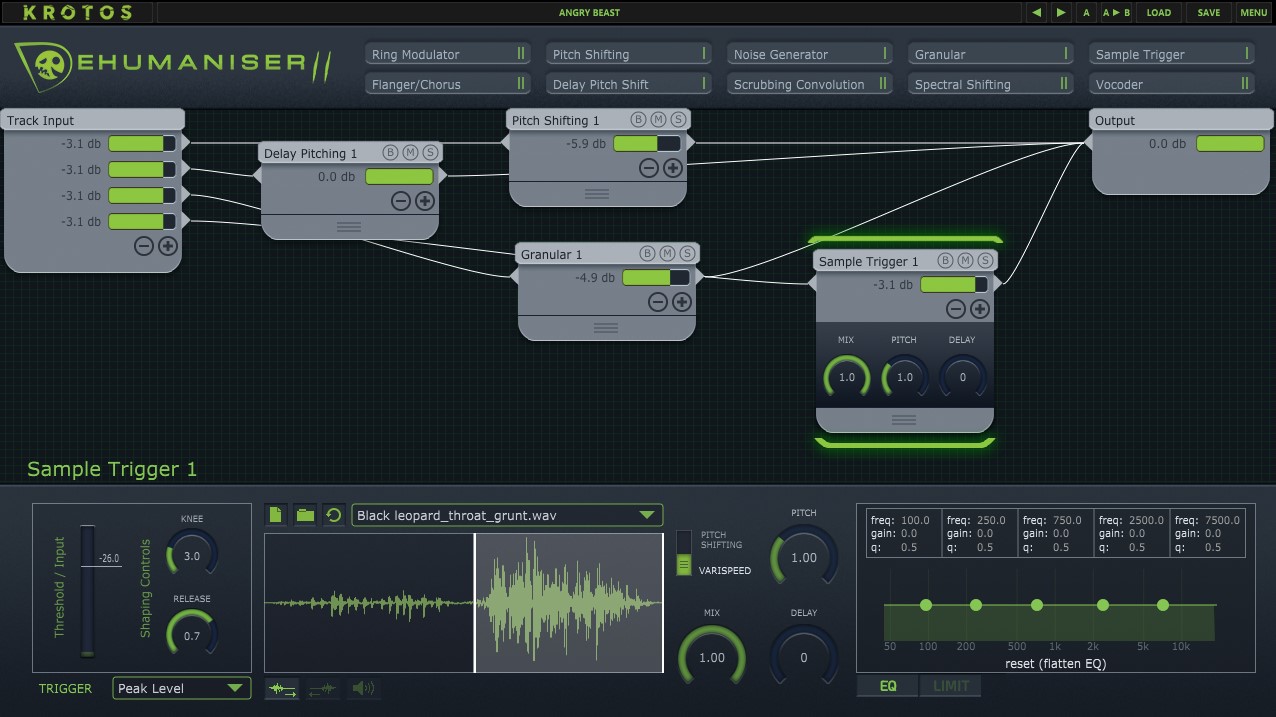
We start here with the default ‘Angry Beast’ preset. The main modules for these kinds of sound designs are pitch shifting and the sample trigger module.
Dehumaniser 2’s powerful pitch-shifting algorithm transposes your recording cleanly, allowing your voice to reach the necessary low frequencies for your monster voices.
The sample trigger module is used to layer animalistic roars and other sounds on top of your own voice. Here we have layered the black leopard roar from the included library, but you can also import your own sounds!
The Signal Chain
Dehumaniser 2’s modular layout lets you run effects in parallel for different textures. The various types of pitch-shifting can be used for different effects, so experiment and try some interesting ways to shape your recording!
Adding Your Own Additional Effects
Once you have your performance and design in place with Dehumaniser 2, you can start to experiment with your sound. Add EQ and compression to even out the dynamic range and add some high-end crispiness, or add some saturation, multiband compression and reverb for even more character.
The Result – Powerful Creature Voice Sound Effects
The finished sound is a powerful, bassy creature roar that is full of texture, achieved with Dehumaniser 2’s powerful pitch shifter and sample trigger running in parallel.
Dehumaniser 2 is a full suite of creative modules to help you in creating all kinds of creatures in your projects. Grab it here:
Add the Ultimate Creature Sound Design Software to your toolkit
View More Tutorials and Articles
Horizon: Forbidden West Sound Design – Redesigning Tremortusk Roars With Dehumaniser 2
Sound Design Tutorial – Adding Texture To Voice Recordings
Dehumaniser Simple Monsters – The Essential Guide